October Release: OnRamp, wherever you work.

This month is about reach. MCP brings OnRamp into your AI tools, Dynamic Dates keep schedules honest, Playbook changes publish to live projects, Aero builds your workflows, and customers can see onboarding inside your own product.

Aero Building Workflows

MCP Server (Available now)

Your OnRamp data in your AI tools.

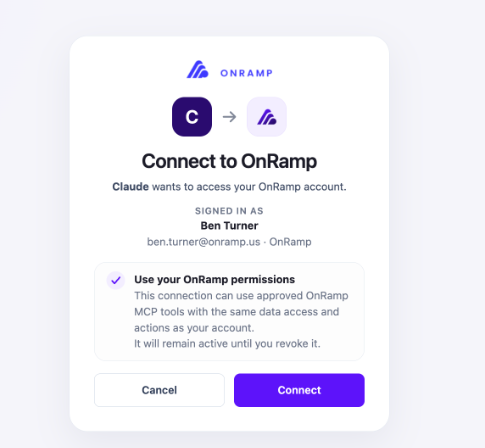
Use OnRamp data in the AI tooling your team already uses. Permission sets stay intact, so people only see what they have access to in OnRamp.

  • Read, view, and change: Work with data where possible across projects, tasks, playbooks, accounts, customer users, and views & insights.
  • Existing permissions: Access follows each user’s OnRamp permission set.
  • Your AI ecosystem: Connect OnRamp to the tools you already use.

Want more information? Check out our Knowledge Base article.

MCP

Dynamic Dates (Available now)

Dynamic Dates

Dates that move with the work.

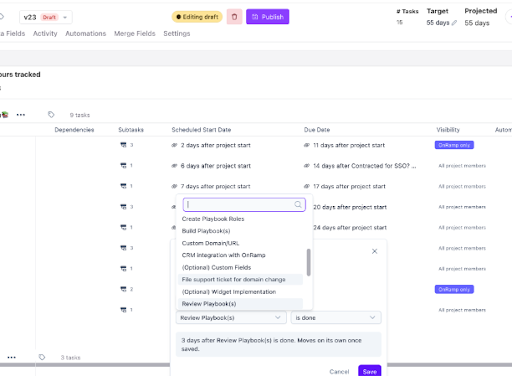
Dates no longer have to be set by hand. Tie them to what drives them, and let schedules adjust as projects change.

  • Dependent dates: Base dates on other tasks, project start or end, or data fields.
  • Target and projected dates: Set a target date. See a projected date based on how the project is performing.

Want more information? Check out our Knowledge Base article.


Playbook & Module Publishing to Live Projects
(Available now)

Update once. Publish everywhere.

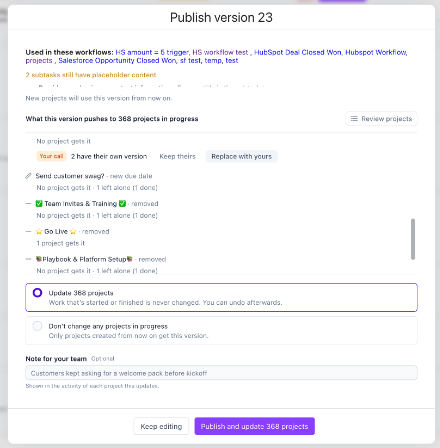
Playbook and module changes (adds, edits, and removals) can now propagate to every existing project that can receive them.


  • Add an Automation to all projects: Done.
  • Add a new task to a module: Everyone gets it.
  • Remove the task no one completes anyway: Gone.
  • Undo in bulk: Made a mistake? Roll it back.
  • Draft & Publish for Modules: Build changes safely, publish when ready.

Want more information? Check out our Knowledge Base article.

Playbook Publishing

Aero Builds Your Workflows (Available now)

Aero Building Workflows

 Describe it. Aero builds it.


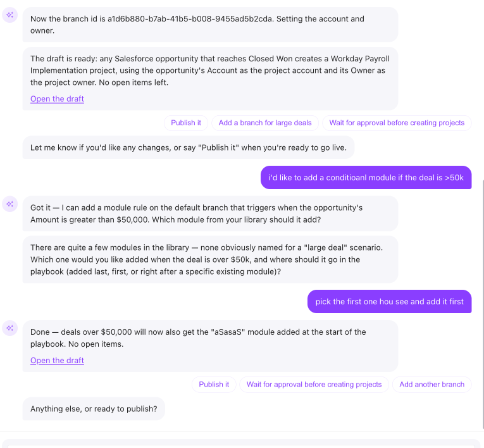
Tell Aero what you need in plain language, and it builds the workflow for you.

  • Start from a sentence: Describe a new workflow in the New Workflow dialog, and Aero drafts it.
  • Change what you have: Ask Aero to edit or extend your existing workflows.
  • Build faster: Get more of your OnRamp automation running in less time.

Want more information? Check out our Knowledge Base article.


Embed Projects Where Your Customers Work (Beta)

Meet customers inside your own product.

  • In-app launcher: Shows live onboarding progress and opens the Portal.
  • One-click access: Straight into the Portal, already signed in, no password needed.
  • Branding without code: Set the launcher color, text color, and an icon or the account’s favicon, with a live preview.
  • Portal in your product: Full onboarding page inside your application. It shows when a user has onboarding to complete and steps aside when done. 

Want more information? Ask your CSM about early access.


Aero Reviewing Customer File Uploads (Available Now)

Customer users can have a file uploaded in the portal validated against what they should be sending.

  • Template files: Add a best practice template in the subtask builder
  • OnRamp AI Review: OnRamp AI reviews the file in the portal and gives the user recommendations based on the template and drafted docs
  • Eliminate Manual Reviews: Users can get immediate feedback and chat with the portal agent about the doc.

Want more information? Check out our Knowledge Base article.


Portal Agent Knowledge Updates (Available Now)

 The portal agent can now index resources.

  • Add Resources to the portal agent: Resources added to the agent will allow the portal agent to respond from those resources
  • Index URLs (Beta): Set a website for the portal agent to periodically crawl and use as part of it’s responses, such as a help site.

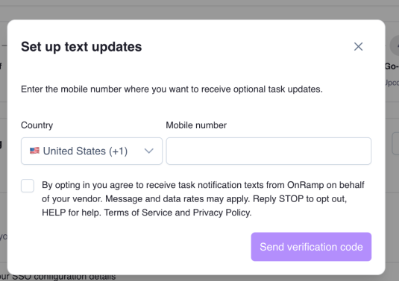
Text Updates on Projects (Available now)

Stay on top of projects without opening the app.

  • Opt in: Get project notifications by SMS.
  • Reply to act: Respond to simple task steps right from a text.
  • Jump in: Open a project straight from a message.

Want more information? Check out our Knowledge Base article.

SMS  Texting

Other Enhancements

  • Rating & NPS questions: Add a rating or NPS question to any form, with an optional “why?” follow-up and reporting.
  • Portal timeline scale: Show the timeline by week, month, or quarter.
  • Portal sign-in subtitle: Write your own subtitle for the sign-in page.
  • Subtask completion dates: Customers can see when each subtask was completed.
  • Wistia videos: Play Wistia videos in tasks, subtasks, and portal embeds.
  • Import your brand: Upload a brand guide to pull its colors into Brand settings, and preview the portal in dark mode.
  • Form responses as PDF: Download one task’s responses as a readable PDF.
  • Views:
      • Click a filter chip to change it.
      • Search data fields.
      • See when the row limit cuts rows off.
      • Sorting now covers every row.
      • New Project Owner column and grouping.
      • Transfer a View to a new owner.
  • Projects list: Add project value as a column.
  • CRM sync: Account Email and Location sync with Salesforce and HubSpot.
  • Customer API: Upload files to a form’s file requests.
  • Aero Voice: Chat with Aero using voice


Coming Soon:

Project On Hold: Pause Without Losing Track. When a customer goes quiet or asks for a pause, put the project on hold and resume it when they’re ready. Everyone can see the pause is on purpose, not a stall.

Work From Your Inbox: Answer, Complete, Done. Task emails will do more than remind. Customers and your team can answer task questions and mark tasks complete right from the email, with no login needed.

Formula Fields: Let OnRamp Do the Math. Create fields that calculate themselves, like days since kickoff or days between two milestones. Use them in Views, exports, emails, and CRM sync.

Customer Journeys: Create Journeys in OnRamp to guide accounts through the customer lifecycle.